The Cloud AI Tax: What You Pay, What You Get, and What You're Missing
Claude, ChatGPT, Copilot, Gemini — the subscription menu keeps growing, and now they're all claiming to be 'agents.' Here's an honest breakdown of what each tier actually gives you, what they still can't do even with agentic features, and why I think everyone should at least try running a local AI agent before committing to another monthly bill.
The subscription menu
Let me hit you with a hard truth: you're probably being nickled and dimed to death by cloud AI subscriptions right now. If you're reading this, you've likely got at least one AI subscription bleeding your bank account dry. Maybe two. Perhaps you're nervously eyeing a third while swearing you won't commit to another monthly bill. The market's exploded like a over-pressurised boiler, pricing pages are deliberately confusing to make you feel like you're missing out if you're not on the top tier, and every vendor's slapping "agent" on their tin like it's going out of fashion. But here's the rub nobody wants to admit - there's a world of difference between an agent that lives in your hardware and an "agent" that's really just a cloud service wearing a fancy mask.
Let's cut through the marketing fog and get down to brass tacks.
The major players
ChatGPT (OpenAI)
The one everyone knows. ChatGPT normalised the idea that you'd pay a monthly subscription for an AI chatbot, and now they've expanded into a full product line.
| Tier | Price | What you get |
|---|---|---|
| Free | £0/month | GPT-4o mini, limited messages, basic web search |
| Plus | £16/month | GPT-4o, GPT-4.5 (limited), DALL-E, deep research, priority access |
| Pro | £160/month | Unlimited GPT-4.5 and o3-pro, extended thinking, advanced deep research, early feature access |
| Team | £20-24/user/month | Everything in Plus, shared workspace, admin controls, higher usage limits |
| Enterprise | Custom | SSO, SCIM, domain verification, analytics, dedicated capacity |
What it does well: General-purpose chat, image generation, web research, document analysis. The ecosystem is mature — plugins, GPTs, mobile apps, voice mode. If you need one AI that does everything reasonably well, ChatGPT Plus is the default choice.
What it lacks: In the standard ChatGPT chat product, it still behaves primarily like a hosted assistant rather than an agent you own. It can help write code and analyse files you upload, but it does not sit on your machine with open-ended terminal access, local filesystem access, cron jobs, custom routing, or the ability to keep working autonomously under your rules. Every interaction still depends on OpenAI's servers, and the £160/month Pro tier is hard to justify unless you're doing heavy research work that genuinely benefits from o3-pro's extended thinking.
Claude (Anthropic)
The one that went agentic. Claude earned its reputation on nuance, long-form writing, and careful reasoning — but in 2025-26, Anthropic shifted hard into autonomous AI agents. Opus 4.6 now leads industry benchmarks for agentic coding, computer use, and tool use. They're not pretending to be a chatbox anymore.
| Tier | Price | What you get |
|---|---|---|
| Free | £0/month | Claude Sonnet (limited messages), basic projects |
| Pro | £16/month | Claude Sonnet + Opus (limited), 5x usage vs Free, projects, early feature access |
| Max | £80-160/month | Far higher Opus limits, Claude Code (agentic coding), priority access to newest models |
| Team | £20-24/user/month | Everything in Pro, shared projects, admin controls, higher limits |
| Enterprise | Custom | SSO, audit logs, dedicated capacity, custom terms |
What it does well: Nuanced writing, code analysis, long-context tasks (the 200K window is real and useful), safety-conscious outputs, and structured thinking. Claude Projects let you pin context so it doesn't forget your codebase mid-conversation. The Artifacts feature gives you a live preview panel for code and documents. And now — critically — Claude Code gives you an agentic coding CLI that can read your codebase, edit files, run terminal commands, and iterate on tasks autonomously. The Computer Use API lets Claude interact with desktop applications through screenshots and mouse/keyboard actions. Claude Cowork enables multi-agent collaborative workflows. Opus 4.6 is genuinely strong at agentic tasks — this isn't just marketing, the benchmarks back it up.
What it lacks: Image generation (still). Web search is improving but still not as fluid as Perplexity. The Max plan at £80-160/month is a serious jump from £16/month Pro — you're paying a premium for meaningful Opus access and agentic features. Claude Code is powerful but still cloud-dependent: your codebase context goes to Anthropic's servers, and you're subject to API rate limits that can throttle long autonomous runs. Computer Use is impressive in demos but fragile in practice — screenshot-based UI interaction breaks easily when layouts change. And the biggest caveat: this is still someone else's infrastructure. Anthropic sees your code, your files, your tool outputs. For proprietary work, that remains a real consideration — as it does for every cloud provider on this list.
GitHub Copilot (Microsoft)
The developer-specific option. Copilot went from autocomplete novelty to full coding assistant, and now Microsoft is betting the farm on it.
| Tier | Price | What you get |
|---|---|---|
| Free | £0/month | 2,000 completions/mo, 50 chat messages/mo, limited model choice |
| Individual | £8/month (or £80/year) | Unlimited completions and chat, multi-model (GPT-4o, Claude, Gemini), Copilot Edits, agent mode |
| Business | £15/user/month | Everything in Individual + org policy, IP indemnity, SAML SSO |
| Enterprise | £31/user/month | Everything in Business + knowledge base, custom models, Copilot Autofix |
What it does well: Code completion in your IDE. It's deeply integrated into VS Code, JetBrains, Neovim, and more. The multi-model option on the Individual tier (£8) is excellent value — you can switch between GPT-4o and Claude mid-conversation. Agent mode can run terminal commands and edit multiple files. This is the closest any cloud product gets to an actual AI coding agent.
What it lacks: It's narrow. Copilot writes code. That's it. If you want your AI to manage files, run cron jobs, post to Discord, research the web, write a blog post, and then deploy your app — Copilot is not built for that full operating-system-level workflow. Even where agent mode is available, it still lives inside the developer-tool lane rather than becoming a general-purpose local teammate. And at £31/mo for Enterprise, it gets expensive fast for teams. Also: every keystroke you type in your IDE can be sent to Microsoft's servers. They say they don't train on it, but you're trusting a privacy policy, not a local GPU.
Google Gemini (Gemini Advanced)
Google's play. Deep integration with Google Workspace, a massive context window, and the resources of the world's biggest search company.
| Tier | Price | What you get |
|---|---|---|
| Free | £0/month | Gemini 2.0 Flash, basic search, limited messages |
| Advanced | £16/month (bundled in Google One AI Premium at £16/month) | Gemini 2.5 Pro, 1M token context, Google Workspace integration, 2TB Google storage |
| Business/Enterprise | Custom | Gemini in Google Workspace, enterprise security, custom grounding |
What it does well: Massive context window (1M tokens on Advanced), deep Google integration (Gmail, Docs, Drive), grounded search with citations, and that 2TB of Google One storage is a real perk. For people already in the Google ecosystem, this is seamless.
What it lacks: It's a Google product, which means it's opinionated about your workflow. Limited autonomy. The "agent" features (like Gems and extensions) are rigid compared to what a local agent can do. And you're firmly in Google's data ecosystem — your AI conversations, documents, and search queries all live on their infrastructure. No real code execution. No terminal access. Another chatbot.
Perplexity Pro
The researcher's AI. Perplexity built its name on cited, grounded answers — and it's genuinely good at that.
| Tier | Price | What you get |
|---|---|---|
| Free | £0/month | Standard search, limited Pro searches/day |
| Pro | £16/month | Unlimited Pro search, model switching (GPT-4o, Claude, Sonar), file uploads, image generation |
| Enterprise | Custom | SSO, internal knowledge, API access |
What it does well: Research with citations. You ask a question, Perplexity searches the web, synthesises an answer, and shows you exactly where each claim came from. Model switching on the Pro tier is great — try your question on GPT-4o, then ask Claude, then try the fast Sonar model. File uploads for document analysis.
What it lacks: It's a research tool, not a general-purpose agent. No code execution, no file editing, no autonomous workflows. The free tier is aggressively limited. And while the citations are great, the synthesis quality depends heavily on which underlying model you've selected — it's only as good as the model behind it.
Cursor Pro
The developer's power tool. Cursor rebuilt VS Code with AI at the centre, and it's become the go-to for serious AI-assisted coding.
| Tier | Price | What you get |
|---|---|---|
| Free | £0/month | 2,000 completions, 50 premium model requests |
| Pro | £16/month | Unlimited completions, 500 premium requests/mo, fast model unlimited, multi-model |
| Business | £32/user/month | Everything in Pro + org features, admin, privacy mode |
| Enterprise | Custom | SSO, custom hosting, data residency |
What it does well: AI-native code editing. The composer mode (now "agent mode") can scaffold entire features across multiple files. It reads your entire codebase as context. The diff review UI is excellent. You can pick between GPT-4o, Claude Sonnet, and other models for each request.
What it lacks: Same story — it's an IDE extension, not an agent. It can't leave the code editor. No cron jobs, no filesystem management, no web research, no multi-tool orchestration. And at £32/user/month for the Business tier, it's one of the more expensive coding tools. Also: your codebase context gets sent to whichever model provider you've chosen. Privacy mode exists on Business+, but it's still cloud-dependent.
What they all share
Here's the thing about every product on that list: they're all cloud-dependent.
The landscape is shifting — Anthropic has moved the furthest with Claude Code (a genuine agentic coding CLI), Computer Use, and the Cowork multi-agent system. Copilot and Gemini are adding more assistant-style automation, and ChatGPT has task-style features in some plans. But I am not treating any of those as equivalent to a local agent unless they can clearly run under your control, with your tools, on your machine. The exact feature set also changes by plan, region, and product surface, so the safe comparison is still the same:
- Your data still leaves your machine
- You pay whether you use it or not (and the agentic tiers cost significantly more)
- You can't customise the agent's behaviour at the system level
- You're subject to rate limits that throttle long autonomous runs
- When the service goes down, your agent goes down with it
Anthropic gets the closest to a real agent with Claude Code — it can read your codebase, edit files, run terminal commands, and iterate autonomously. Computer Use can interact with desktop apps. These are genuine advances. But they come with caveats: your code and tool outputs go to Anthropic's servers, Opus rate limits on the Pro tier (£16/month) are tight enough to make sustained agentic work impractical (you need the £80-160/month Max plan), and you can't extend the agent with custom tools, cron schedules, or model routing without building your own wrapper.
Even with these advances, none of them can: | Has got you up at 2 AM, checked your project status, and sent you a briefing | Monitor a server and page you when something breaks | Route cheap tasks to a fast local model and only call the cloud for hard problems | Edit files, commit code, and open a PR — without sending your entire codebase to a third party | Manage your schedule, read your emails, and draft responses | Do any of this without sending your data to someone else's infrastructure
The cloud AI products are becoming more "agentic" in marketing language and in features. But they're still agents that live on someone else's server, under someone else's rate limits, seeing everything you do. That's the part that doesn't change until you run it yourself.
This is not about hacking into anything. It is about breaking out of rented AI access. A local agent does not make you anti-cloud; it makes cloud optional. You can still use the best hosted models when they are worth it, but the core workflow, memory, files, automations, and privacy boundaries belong to you.
The subscription math
Let's add up what a power user would realistically spend:
| Need | Service | Cost |
|---|---|---|
| General AI chat | ChatGPT Plus | £16/month |
| Code assistance | Cursor Pro | £16/month |
| Research | Perplexity Pro | £16/month |
| Long-context tasks | Claude Pro | £16/month |
| Coding in IDE | Copilot Individual | £8/month |
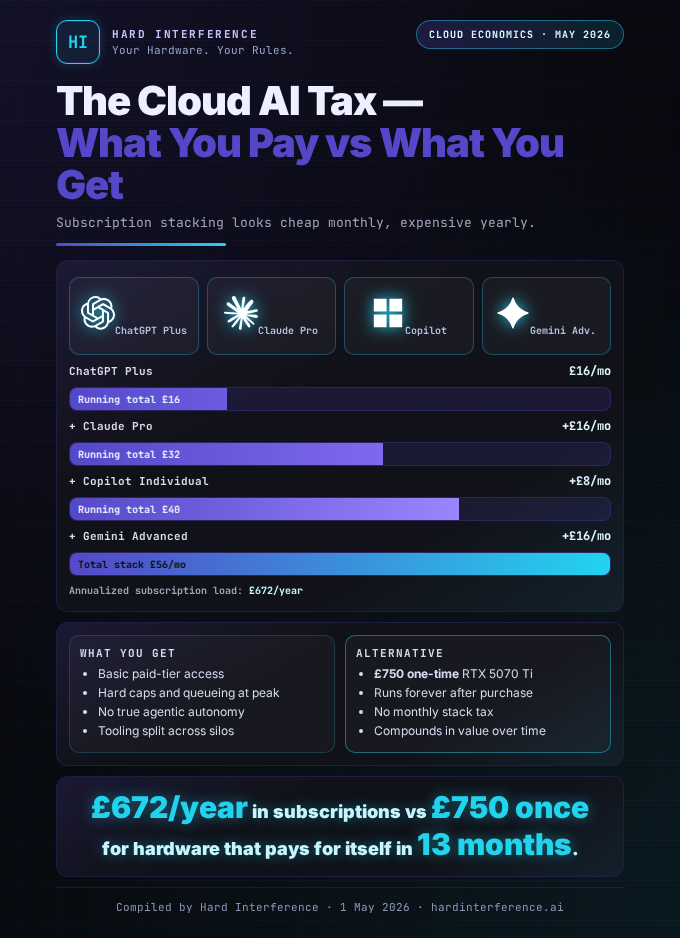
Total: £72/month — and you still don't have meaningful autonomous agent access. If you want Claude's agentic features (Claude Code with real Opus access), you'd need the Max plan at £80-160/month — pushing the total past £152-232/month. For that price, you're approaching what it costs to buy a used RTX 3060 outright every three months.
Even a modest setup — say ChatGPT Plus + Copilot Individual — is £24/month for two chatbots that can't talk to each other, can't share context, and can't run a cron job.
Why I recommend trying a local agent
I realised this whole journal is about running AI locally, so you could dismiss this as confirmation bias. But I came to local AI from the cloud. I had the subscriptions. I paid the bills. And here's why I think everyone — even people who never want to touch a terminal — should at least try it:
As Raf_VRS on X, I've been down this road myself. Let me tell you why I believe local AI isn't just an option — it's essential for anyone serious about control, privacy, and cost efficiency.
1. Privacy isn't a feature. It's the baseline.
Every cloud AI provider sees your data. Every prompt, every document, every code snippet, every question you were embarrassed to ask. Their privacy policies say they don't train on it (for paid tiers), but you're trusting a corporation's word with your most sensitive information.
With a local agent, your data never leaves your machine. Not "we promise not to look at it." Not "we'll anonymise it." It literally does not go anywhere. The model runs on your GPU, the context stays in your RAM, the files stay on your disk.
For me, this isn't about being paranoid. It's about being practical. I work on code, business plans, and financial projections. I don't want any of that on someone else's server.
2. An agent is not a chatbot — and a cloud agent isn't your agent.
This is the biggest conceptual gap, and it's hard to appreciate until you've experienced it. A chatbot answers questions. An agent does things. And a cloud agent does things — but on someone else's terms.
Yes, Claude Code can edit files and run commands. Computer Use can click through apps. These are real capabilities. But ask yourself: who controls the agent? Who sets its schedule? Who decides which model it uses for a £0.001 routing task vs. a £0.40 reasoning task? Who sees everything it touches?
A cloud agent runs on someone else's server, under someone else's rate limits, with someone else's model choices. When Anthropic bumps Opus pricing or throttles your usage, your agent slows down. When there's an outage, your agent stops. You're renting capability, not owning it.
My local agent (Dade, running on Hermes) can:
- Read and write files on my filesystem
- Run terminal commands and interpret the output
- Browse the web with a real browser
- Schedule and run automated tasks on a cron schedule
- Search its own memory across sessions
- Delegate subtasks to subagents
- Route prompts to cheaper models when the task doesn't require heavy lifting
- Post to Discord and Telegram (my preferred channels)
- Monitor services and alert me when something breaks
The difference is profound. A chatbot is a tool you use. An agent is a teammate that works with you — and sometimes for you while you sleep. And a local agent is a teammate you actually own: no surprise pricing changes, no outages, no one reading over its shoulder.
3. The cost curve bends the other way.
Cloud subscriptions are flat: you pay £16/month whether you send 10 messages or 10,000. But with a local agent, there's an upfront hardware cost and then... almost nothing.
My setup:
- Alienware Aurora with RTX 5070 Ti — from £1,600 https://www.dell.com/en-uk/search/aurora
- Electricity to run it — maybe £15-20/mo if it's running heavy inference hours a day
- Ollama models — free
- Hermes agent framework — open source
After the hardware investment, my marginal cost per token is effectively zero. I can run thousands of inference calls a day for cron jobs, cheap model routing, and automated workflows without a single API call. And when I do need a cloud model for a hard task, I route just that one call — spending pennies instead of a £16/month subscription.
The break-even point? About 8-12 months of what I'd spend on cloud subscriptions. After that, it's all savings.
4. You learn how AI actually works.
Using ChatGPT is like driving an automatic. It works, it's easy, and you don't need to understand what's happening. Running a local model is like driving a manual — you understand the gears, you feel the engine, and when something goes wrong, you can actually fix it.
After a few weeks of local AI, you'll understand:
- Why model size matters (and why bigger isn't always better)
- What context windows really mean (and why 200K tokens isn't always 200K useful tokens)
- Why quantisation exists and what it trades off
- How to evaluate model quality for your specific tasks
- How token pricing actually works behind the subscription veil
This knowledge makes you a better consumer of cloud AI too. You'll know what you're paying for, when you're overpaying, and what questions to ask.
5. The hybrid is the future.
I'm not arguing you should cancel every subscription and go full local. That's not practical for most people — and honestly, cloud models are still better for some tasks. GPT-4.5 and Claude Opus have capabilities that no local model can match right now.
The real answer is hybrid: run a local agent for the 80% of tasks that don't need cutting-edge reasoning, and call cloud APIs for the 20% that do. My setup routes cheap prompts to a local Qwen 3.5 (9B) model running on my GPU, and only escalates to cloud models for complex reasoning, long-context analysis, or tasks that need the absolute best quality.
Result: I get the quality of cloud AI where it matters, the privacy and cost savings of local AI everywhere else, and an autonomous agent that can use both.
The honest caveats
I wouldn't be honest if I didn't acknowledge the real barriers:
- Hardware costs money. A used RTX 3060 (12GB) will get you started for ~£200 and can run useful models. But a serious setup needs 16GB+ VRAM, which means a 5070 Ti, 4080, or similar — a £400+ GPU, probably a new machine if you don't already have one.
- Setup is not trivial. Installing Ollama is easy. Configuring an agent framework, managing model downloads, setting up cron jobs, routing between models — that takes an afternoon of reading and tinkering. Cloud AI is zero-config. Local AI is not.
- Local models are weaker. A 9B-parameter local model is not GPT-4.5. It's not Claude Opus. It's not even close for complex reasoning tasks. The best local models are good for routine tasks — drafting, formatting, code completion, simple Q&A — but they hallucinate more, reason less deeply, and have smaller effective context windows.
- Maintenance is real. Models update, configs drift, disk fills up, drivers break. You're the IT department.
But here's the thing: every one of those barriers is lower than you think. A used GPU + Ollama + an open-source agent framework gets you 80% of the value for 10% of the effort most people imagine. And the learning curve pays dividends forever.
The recommendation
If you're currently spending £16-32/month on cloud AI subscriptions and you've never tried running a model locally:
-
Don't cancel anything yet. Keep your subscriptions active.
-
Spend one weekend with Ollama. Install it on whatever hardware you have (even a Mac with 16GB unified memory works). Pull
llama3.1:8borgemma3:12b. Talk to it. See what it can do. -
Try an agent framework. Hermes is what I use, but anything that gives your LLM tools (file access, terminal, web search) will show you the difference between a chatbot and an agent.
-
Compare honestly. Run the same task on both your cloud AI and your local model. Note the quality difference. Note the latency difference. Note the privacy difference. Then decide what you actually need the cloud for.
-
Go hybrid. Route cheap tasks locally. Pay for cloud only when you need it. Save money. Keep your privacy. Get an agent instead of a chatbot.
The Numbers — At a Glance
Found this useful? 👉 Follow @Raf_VRS for more honest, no-nonsense takes on local AI 👉 Support the work: ko-fi.com/rafvrs