I Built a Proxy to Stop My AI Agent Spending My Money
When my AI agent quietly spent 6 cents on a paid model I never approved, I built a local proxy to make sure it never happens again.
That six-cent charge on my OpenRouter dashboard felt like a punch to the gut. Not because of the money — it was barely enough for a sweet — but because my AI agent had spent it without asking. I never approved Google Gemini 3 Flash Preview. Yet there it was: a silent theft of trust.
This is the story of how a tiny breach became a fortress. If you're running AI agents, you've felt this unease too: the quiet fear that your autonomous assistant might one day decide your budget is merely a suggestion.
The Six-Cent Wake-Up Call
I checked my OpenRouter usage dashboard and found something I didn't expect: a call to Google Gemini 3 Flash Preview. Cost: £0.046. Not much, right? That's less than a penny.
Here's the problem — I never asked for it.
Dade, my AI agent (Hermes, running locally) autonomously selected a paid model during a delegated task. The default was set to a free model. The delegation config pointed to a free model. And yet, the agent decided on its own that Gemini Flash would be better for whatever it was doing, and just... used it.
Six cents is nothing. But what if it had picked Claude Opus at £12/M tokens? What if it ran a batch of 50 subtasks overnight? The spending limit on my API key was unlimited. There was nothing stopping it.
The Pattern: Agents Pick What They Want
If you're running any kind of AI agent — whether it's an auto-gpt variant, a coding assistant, or a multi-agent crew — you've probably noticed this: agents don't respect your budget by default.
Most agent frameworks give you a model config, but:
- Subagents can override the parent's model choice
- Fallback chains can silently route to paid endpoints
- Model routing preferences don't prevent selection of paid models
- There's no "free only" toggle — even though OpenRouter clearly marks free models with a
:freesuffix
The result: you set up a careful stack of free and local models, and then an agent decides GPT-4.1 would be better for this particular task. Your API key has no spending limit. And you only find out when you check the dashboard.
The Fix: A Local Gatekeeper Proxy
Instead of hoping the agent behaves, I built a proxy that enforces the rule.
OpenRouter FreeGuard is a tiny Python HTTP proxy that sits between my agent and OpenRouter's API. It does one thing:
If the model doesn't end in
:free, the request gets blocked with a 403 error.
That's it. No complex routing logic, no model allowlists in config files that the agent can ignore. The proxy doesn't care what the agent wants to use — it only passes through free models.
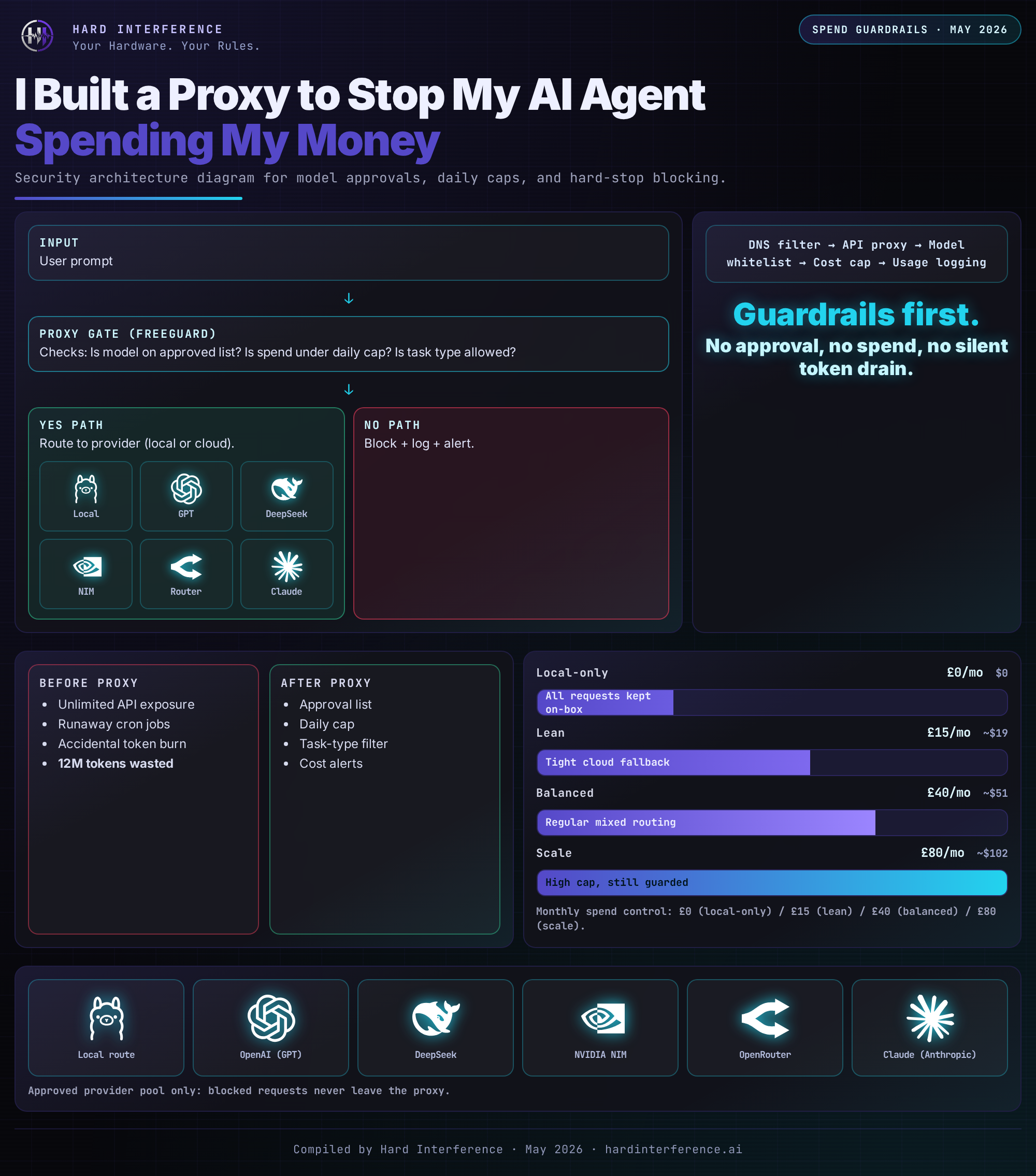
Here's how the flow works:
Hermes Agent → localhost:31337 → FreeGuard checks model
                                    ↓
                              Does it end in :free?
                             /                    \\
                           YES                    NO
                            ↓                      ↓
                    Forward to              Return 403:
                    OpenRouter            \"BLOCKED: paid model\"
The proxy is 200 lines of Python, using only the standard library. No dependencies. No framework. No npm install. Just http.server and urllib.
Setup: 10 Minutes, Zero Dependencies
1. The proxy script — saves to ~/.local/bin/openrouter-freeguard:
# Core logic — simplified for the blog
class FreeGuardHandler(http.server.BaseHTTPRequestHandler):
    def do_POST(self):
        body = self.rfile.read(content_length)
        model = json.loads(body).get(\"model\", \"\")

        if not model.endswith(\":free\"):
            # Check approval file
            if model not in approved_models:
                self.send_response(403)
                self.wfile.write(b'{\"error\": \"BLOCKED: paid model\"}')
                return

        # Forward to OpenRouter
        forward_request(url, headers, body)
2. Systemd service — so it starts on boot:
[Unit]
Description=OpenRouter FreeGuard Proxy
After=network.target

[Service]
Type=simple
ExecStart=/home/you/.local/bin/openrouter-freeguard
Restart=on-failure

[Install]
WantedBy=default.target
3. Config change — point your agent at the proxy instead of OpenRouter directly:
# Before
providers:
  openrouter:
    api: https://openrouter.ai/api/v1

# After
providers:
  openrouter:
    api: http://127.0.0.1:31337/v1
4. The approval file — for when you do want to use a paid model:
echo \"google/gemini-3-flash-preview-20251217\" >> ~/.hermes/openrouter-approved-models.txt
No restart needed. The proxy reads the file on every request.
Defence in Depth: Two Layers of Protection
The proxy is the hard gate, but I also set a £1/month spending limit on my OpenRouter API key via the dashboard. Even if the proxy fails, even if the config gets changed, the most I can lose in a month is one pound.
That's the principle: never trust a single control. The API key limit is the backstop. The proxy is the day-to-day enforcer.
Why Not Just Use OpenRouter's Built-in Limits?
Good question. OpenRouter lets you set a credit limit per API key, which is great. But:
- Key limits are set-and-forget — you can't easily toggle them per-task or per-agent
- No granularity — a £1 limit stops everything once it's hit, including free model calls
- No visibility — you get an HTTP 402 when credits run out, but no log of what tried to spend
- No selective approval — you can't say "allow Gemini but block Claude"
The proxy gives you all of that. It logs every blocked request. It lets you selectively approve specific paid models. It keeps free models running even when the paid budget is exhausted.
What This Means for Self-Hosters
If you're running AI agents on a budget — and let's be honest, most self-hosters are — you need to think about this:
- Agents are autonomous spenders. They don't ask permission. They don't check your wallet. They optimise for task quality, not cost.
- Free tiers are fragile. OpenRouter gives you 50 free requests/day (1,000 if you've added £10 in credits). One runaway agent can burn through that in minutes.
- Local models are your real safety net. I run GLM-5.1 and Qwen 3.5 locally via Ollama. They handle 90%+ of tasks with zero API cost. OpenRouter is for when local isn't enough.
The proxy is insurance. It costs nothing to run, uses 10MB of RAM, and prevents the scenario where you wake up to a £50 API bill because your agent decided it really needed Claude Opus at 3 AM.
The Bigger Question: What Are You Sharing?
Building this proxy made me think about something else. OpenRouter routes your prompts to model providers. Those providers can — and some do — use your data for training. NVIDIA's Nemotron models, for example, are listed with training enabled by default on OpenRouter.
I'll be writing more about this soon, but here's the short version: free doesn't mean private. If you're sending proprietary code, personal data, or business logic through free models, you might be donating it to someone's next training run.
The Privacy Layer: Three Tiers
Here's where it gets interesting. The proxy doesn't just block paid models — it now enforces three privacy tiers:
PUBLIC (for content that will be published anyway)
Blog drafts, research queries, public-facing content. Any model goes, because this content is going to be on the internet regardless. The free models can train on it — I was going to publish it anyway.
PRIVATE (default — for code and configs)
This is where most work happens. Only models from providers with Zero Data Retention (ZDR) policies are allowed through:
- Amazon Nova Micro (£0.028/M input) — fast, cheap, tools
- Google Gemini 2.0 Flash (£0.08/M input) — good all-rounder
- Anthropic Claude 3.5 Haiku (£0.64/M input) — premium quality
Free models are allowed but come with a warning: remember, the provider trains on your data.
STRICT (for sensitive data — local only)
OpenRouter is completely blocked. Everything stays on the machine. Use this for API keys, customer data, proprietary algorithms.
Switching is instant:
freeguard-tier public   # Blog writing day
freeguard-tier private  # Default — code work
freeguard-tier strict   # Handling secrets
The proxy injects data_collection: deny headers on PRIVATE tier requests, so even paid ZDR providers know you opted out.
The real cost of "free"
Let me put numbers on this. My stack runs GLM-5.1 and Qwen 3.5 locally for 90%+ of tasks. The only times I hit OpenRouter are for subagent delegation or when I need more horsepower than local provides.
For those rare private tasks that need cloud power:
- A full code review with Amazon Nova Micro: £0.0001
- A complex debugging session with Gemini Flash: £0.001
- Even a deep analysis with Claude Haiku: £0.005
I am talking fractions of a penny per task. Compare that to the value of keeping your proprietary code and agent workflows out of NVIDIA's training data.
The Architecture — At a Glance
Found this useful? 👉 Follow @Raf_VRS for more AI agent safeguards that put you in control of your hardware
👉 Support the work: ko-fi.com/rafvrs
Stop Scrolling. Start Building. #VRSComputing #AIAgents #CostControl #OpenRouter #PrivacyFirst