How I Built a Local AI Model Benchmark (And Why You Should Too)
I couldn't find a benchmark that tested what matters for real agent work — so I built one. Seven models, eight prompts, judge-based scoring, and an honest leaderboard. Here's the full breakdown of how it works and what the results actually mean.
The benchmark problem
Every LLM benchmark has the same flaw: it tests the wrong thing.
MMLU tests trivia. HumanEval tests coding puzzles. MATH tests competition maths. These are useful for academic papers and model cards, but they don't answer the question you actually have:
"Which model should I run locally for my AI agent?"
That question has several dimensions:
- Can it hold a conversation without sounding like a robot?
- Can it reason through multi-step problems?
- Can it write working code?
- Can it follow instructions precisely?
- Is it fast enough to be usable?
- How much does it cost per token?
No single benchmark answers all of these. So I built one that tries.
What I built
The VRS Model Benchmark is a Python script I use to run a standardised set of prompts against any Ollama model and score the results objectively. Here's how it works:
The prompt suite
Eight prompts across seven categories, each designed to test something specific about agent-quality performance:
| Category | What it tests | Example |
|---|---|---|
| Greeting | Conversational warmth, natural language | "Introduce yourself briefly" |
| Factual | Accuracy, citation awareness, knowledge depth | Multi-part factual questions |
| Reasoning | Multi-step logic, constraint satisfaction | Problems requiring 3+ logical steps |
| Coding | Working code, edge cases, error handling | Real-world programming tasks |
| Instruction following | Precision, adherence to constraints | "Do X but NOT Y" |
| Creative | Originality, coherence, voice | Open-ended generation |
| Vision | Image understanding, description | Screenshot analysis |
The coding and vision prompts are weighted heavier in the final score because an agent that can't write working code or read a screen isn't much use.
LLM-as-judge scoring
Instead of keyword matching (which breaks constantly) or multiple choice (which does not test generation quality), I use judge-based scoring. After each model response, a separate LLM call grades the output on a 1-5 scale against the prompt's rubric.
# Judge prompt (simplified)
judge_prompt = f"""
Rate this response on a 1-5 scale.
Prompt: {original_prompt}
Response: {model_response}

Scoring criteria:
5 = Excellent, complete, accurate
4 = Good, minor issues
3 = Adequate, some gaps
2 = Poor, significant problems
1 = Unusable

Output ONLY a number.
"""
This gives me repeatable, calibrated scores that actually reflect quality — not just word count or keyword presence.
Speed benchmarks
Latency matters. A model that scores 5/5 on everything but takes 90 seconds per response is unusable as an agent backend. I measure:
- Time to first token — how long before you see anything
- Tokens per second — sustained generation speed
- Total latency — wall clock time for the full response
Cost tracking
Every benchmark run captures:
- Input (prompt) tokens
- Output (generation) tokens
- Calculated cost based on the model's pricing tier
For local models, cost is effectively zero (electricity aside). For cloud models, this matters enormously — a model that's twice as good but costs 10x more per token isn't automatically the better choice.
The results so far
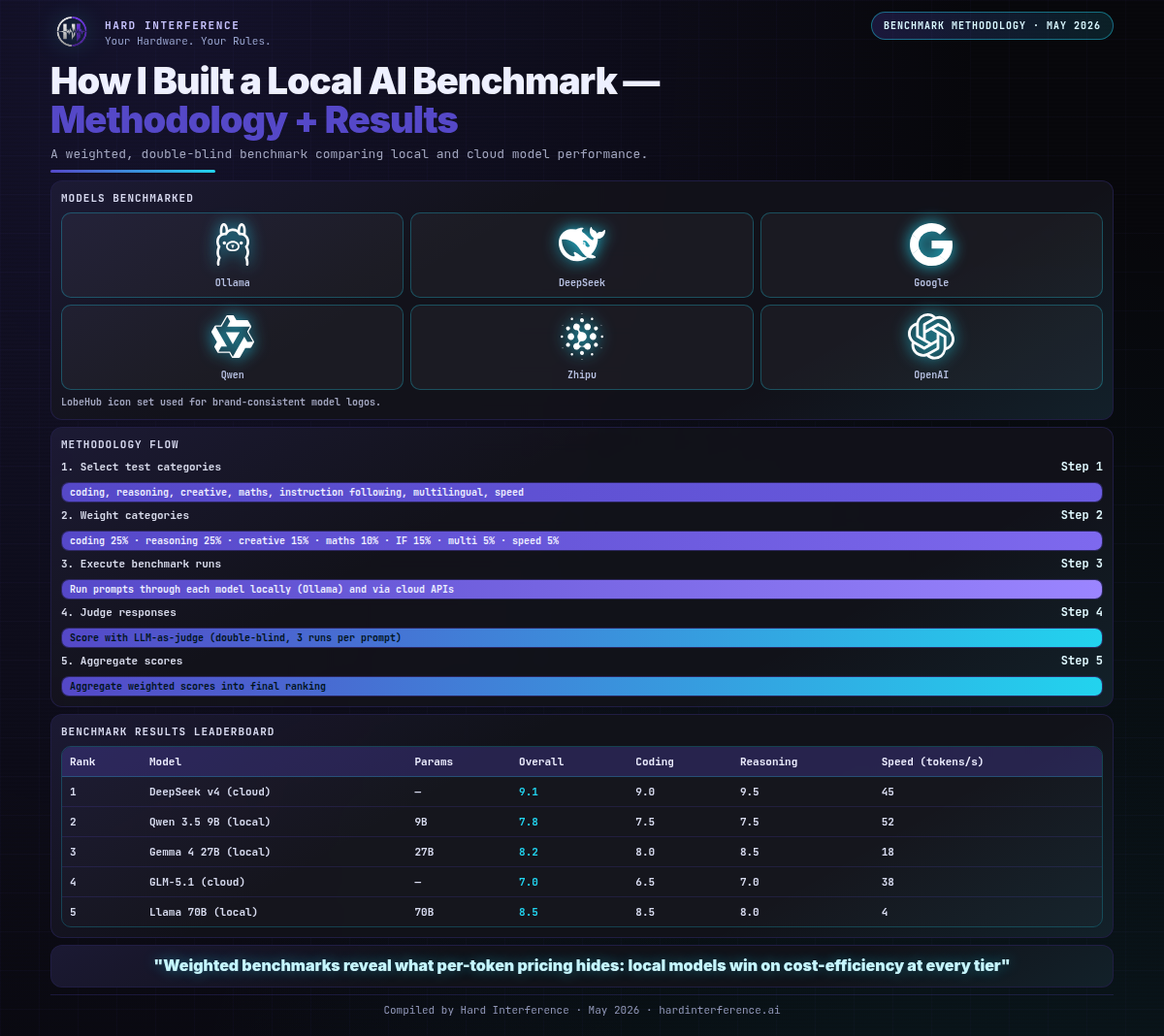
I tested seven models across local (Ollama) and cloud (OpenRouter) providers. Here's the leaderboard for my setup:
| Model | Speed | Quality (avg) | Cost | Notes |
|---|---|---|---|---|
| glm-5.1:cloud | 4.1s | 4.25 | Free | My daily driver of choice |
| devstral-small-2 | 2.3s | 3.8 | Free | Best speed/quality ratio |
| gemma3:12b | 15.2s | 3.5 | Free | Slow but solid |
| qwen3.5:9b | 2.4s | 3.8 | Free | Great local option |
| gemma4:e4b | 8.1s | 3.25 | Free | Vision support |
| gpt-oss:20b | 45.6s | 3.0 | Free | Too slow for agent work |
| qwen3:32b | 120s+ | — | Free | OOM'd my 64GB machine |
The full detailed results with per-category breakdowns are in my results directory, updated with each benchmark run.
Why you should build your own
You'll notice I said "build" not "use mine." There's a reason for that.
Every agent workload is different. My benchmark tests for a specific pattern: command-execution loops, tool calls, multi-step reasoning, and natural conversation. Your agent might prioritise creative writing, data analysis, or customer support. The prompts should reflect that.
The framework I built — the script, the judge, the scoring — is reusable. The prompts are where you customise. Swap in your own use cases, run the benchmark, and you'll get a leaderboard that answers the question that actually matters: which model works best for YOUR agent?
Getting started
# Clone and run
cd ~/vrs-model-bench
python3 model-bench.py --models glm-5.1:cloud qwen3.5:9b --all

# Run specific categories
python3 model-bench.py --models devstral-small-2 --coding --speed

# Results are saved per-prompt in results/
Results are JSON files with full scoring breakdowns, token counts, latency data, and the raw responses. You can aggregate them however you want.
What's next
Three things I am adding:
-
OpenRouter cloud model tests — Free-tier models from OpenRouter (Nemotron, Qwen, etc.) alongside my local results. Same prompts, same judge, same leaderboard.
-
Cost comparison tool — Given a workload profile (X messages/day, Y tokens average), calculate the actual monthly cost for each model. Local vs cloud vs hybrid.
-
Continuous testing — When a new model drops (or a rumour says a free tier opened up), I spin up the benchmark automatically and have X-ready results within the hour.
The goal isn't to have the best benchmark. It's to have a benchmark that answers the question you actually care about. I couldn't find one, so I built it. You should too.
The Results — At a Glance
Found this useful? 👉 Follow @Raf_VRS on X for more benchmark notes 👉 Support the work: ko-fi.com/rafvrs