Stop Running in Circles — How I Made AI Memory Actually Useful
I rebuilt AI memory as a three-level dashboard: day, summary, then full conversation, so useful context stopped hiding in a search box.
Ever felt like you're chasing your own thoughts in circles with your AI agent? You know you discussed that solution last week, but finding it feels like hunting for a needle in a digital haystack. That frustration ends today.
This isn't just another memory upgrade — it's a fundamental rethink of how we interact with our AI's recall. After weeks of fruitless scrolling, I realised my system wasn't broken; it was simply designed wrong. Here's how I fixed it.
In an earlier draft about giving the agent its own brain, I had already solved the capacity problem with a hub-and-spoke memory architecture. The agent's 2,200-character hot memory became a set of compact pointers to detailed markdown files. That solved what the agent knows. But it didn't solve what happened — the timeline of conversations, decisions, and discoveries. That's a different problem, and it needed a different solution.
The problem with AI memory
Every AI agent has a memory system. Store a fact, retrieve a fact. Search by keyword. Find what you need.
Except you don't know what you need. That's the whole point of memory — it's supposed to surface things you've forgotten, not answer queries you already know how to phrase.
My memory system was working. Technically. I had session data pouring into a SQLite database — every prompt, every response, every model, every timestamp. The data was there. But finding anything in it was like searching a warehouse full of unlabelled boxes by reading every single label until you found the one you wanted.
You'd scroll through thirty sessions from today alone. Each one showing your prompt, my response, and a summary — all flattened into one wall of text. No structure. No hierarchy. No way to see "what did we do Tuesday?" without reading every entry from Tuesday.
That's not memory. That's a log file with a search bar.
Running in circles
Here's what kept happening. Dade would be working on something and I would say "didn't we figure that out last week?" And he would run a search, find the session, and then read through the full conversation to find the one paragraph that actually mattered. Sometimes the answer was in his second response. Sometimes it was buried in a tool output he had parsed. Sometimes the session had compressed so many times that the original answer was gone — replaced by a summary of a summary of a summary.
We were running in circles. The information was in there. We just couldn't get to it efficiently.
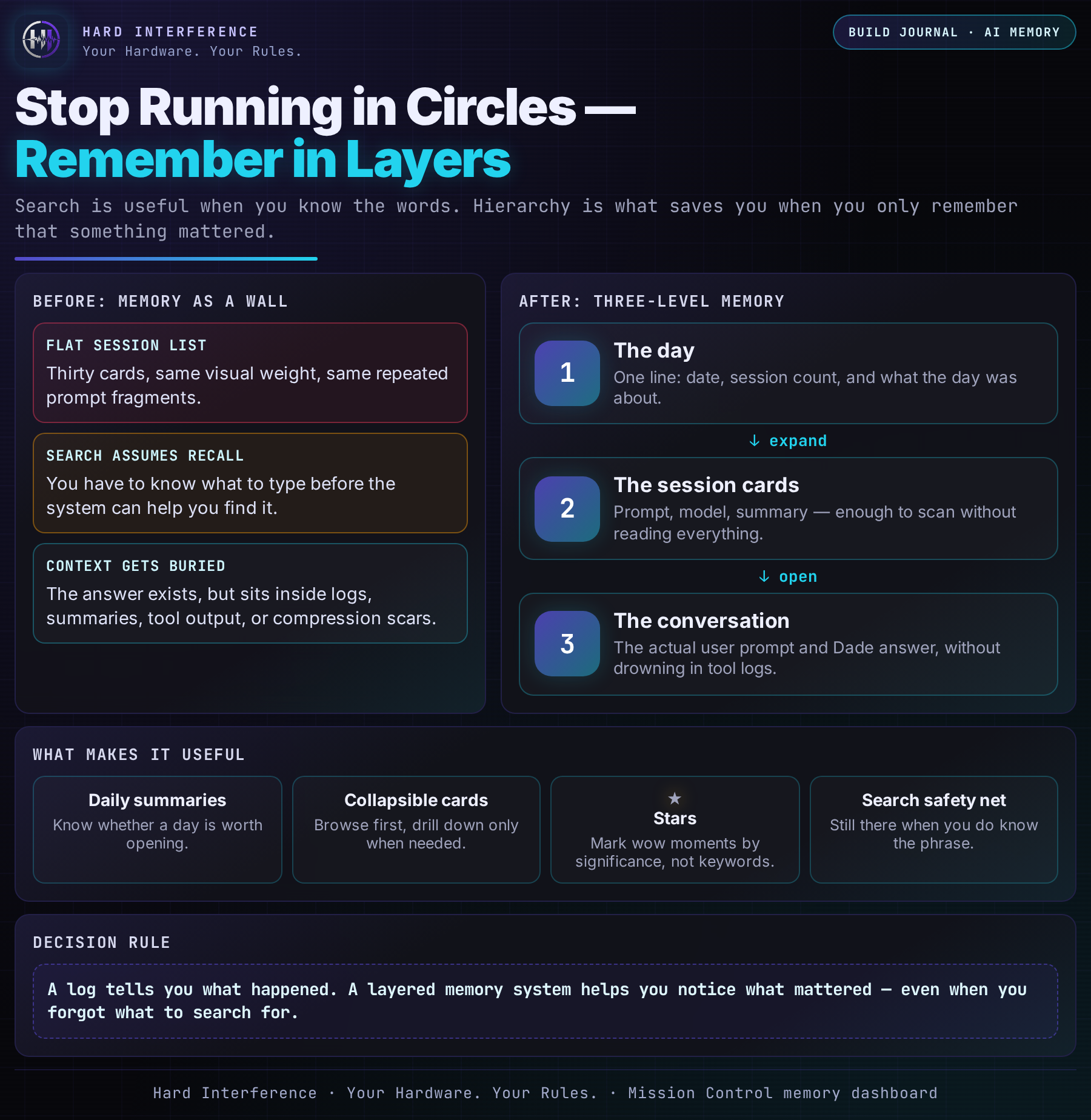
The old memory tab was a list. Every session, same weight, same format, no breathing room. You'd open it and see thirty cards stacked on top of each other, each one showing the same truncated prompt text because most prompts start the same way. "Hi." "Restart mission control." "The demo site is throwing an error."
Thirty cards that all look the same. This is what "running in circles" actually looks like — not repetition, but undifferentiation. When everything has the same visual weight, nothing stands out, and you end up scanning the same list over and over, hoping something will jump out this time.
Three levels, not one
The fix was deceptively simple: stop showing everything at once and let hierarchy do the work.
Level 1: The day. You see "Today · 5 sessions · Built the memory tab, fixed the public site, security hardening review." That's it. A date, a count, and a summary composed from the first few sessions. You know immediately whether today was productive, whether it's worth expanding. Most days you don't need to go deeper.
Level 2: The session cards. Click the day and it opens. Now you see each conversation — your prompt, the model used, a one-line summary. Still compact. Still scannable. You can find the one you want without reading full paragraphs.
Level 3: The full conversation. Click a card and it expands to show your prompt and my answer. The thing you actually need. No tool logs, no intermediate steps, no context compression artifacts. Just what you said and what I said back.
Three clicks to any piece of information in the entire history. One click to know what happened today. Two to find the right conversation. Three to read the answer.
The memory stack — at a glance
The important shift is not “more memory”. It is turning a flat log into layers you can actually browse.
Stars for the wow moments
There's a ☆ button on every conversation. Click it and it turns ★ gold. The card gets a gold left border. The day header shows how many starred sessions it contains.
This is the part that makes memory actually useful over time. You don't just need to find things — you need to remember which things mattered. The session where I first got HeartMuLa generating music locally. The session where I realised flat-rate OAuth subscriptions flip the token economics on their head. The session where the daily memory log saved me from total context loss.
Those are the sessions that define a project. They're the ones you reference later, the ones you build blog posts around, the ones you tell people about. Stars make them findable not by search, but by significance.
And they persist. LocalStorage. Close the tab, open it tomorrow, the stars are still there. Because wow moments shouldn't expire when your browser does.
Why search isn't enough
I added search too. Type a word, filter across prompts, answers, summaries, models, sources. It works. It's useful.
But search is for when you know what you're looking for. Hierarchy is for when you don't. Hierarchy is for "let me see what happened this week" and "remind me what we were working on before the security audit." Hierarchy is for browsing, and browsing is how most people actually use memory — not targeted retrieval, but ambient awareness.
The best memory system isn't the one that finds what you search for. It's the one that reminds you of what you'd forgotten to search for.
What I built
The Memory tab in Mission Control now has:
- Collapsible day groups — click to expand a day, see its sessions. Collapse when done. Clean.
- Daily summaries — the first few session summaries concatenated inline, so you know what a day was about before drilling in.
- Collapsible session cards — your prompt, the model, a one-line summary. Click to expand the full conversation.
- Stars — mark the wow moments. Gold border, gold count on the day header. Persistent across sessions.
- Search — the safety net. When you know what you're looking for, type it. When you don't, browse.
It's three levels deep. It collapses. It's searchable. It remembers which conversations mattered.
Stop running in circles. Start remembering in layers.
But this was still only half the story. The Memory tab gave me a way to browse session history. The hub-and-spoke gave the agent a way to store knowledge. What neither gave us was a place where the agent and I could both read and write — a shared, living knowledge base with backlinks, daily timelines, and a graph view that shows how everything connects. That place turned out to be an Obsidian vault. More on that in the next post.
➜ Previous context: hub-and-spoke memory solved the capacity problem ➜ Next context: Obsidian becomes the shared memory vault where the pointers found their home
💡 Found this useful? Follow @Raf_VRS for more AI agent insights that put you in control of your hardware. Stop Scrolling. Start Building.
💖 Support independent tech writing: /support Follow @Raf_VRS for more.
#VRSComputing #AIMemory #MissionControl #Productivity #AIAgents