The Agent Memory Architecture I Actually Run
My AI agent treats hot memory as a bootloader. The real system is made from memory spokes, hygiene passes, Obsidian mirrors, local recall, and hardware I can audit.
Akshay Pachaar has a post doing the rounds on X about Hermes Agent memory: hot memory, session history, skills, curators, optional memory providers.
Everything you need to understand and customize Hermes Agent. Self-evolving skills, three-tier memory, GEPA optimization, and going from 1 to 10 agents that work for you 24/7.
— Akshay 🚀 (@akshay_pachaar) May 17, 2026
If the embed does not render on your client, use the direct post link: Akshay Pachaar's Hermes Agent Masterclass.
It is the right conversation to be having, because memory is where agent work either becomes useful or turns into elaborate amnesia with a nice terminal theme.
I have been running this stack long enough to learn the awkward bit: the clever part is not giving the agent more memory. The clever part is deciding what kind of memory belongs where.
Here is the architecture I actually run.
No vendor theatre. No mystical “AI remembers me” fluff. Just the working pattern I would rebuild if I had to start again tomorrow.
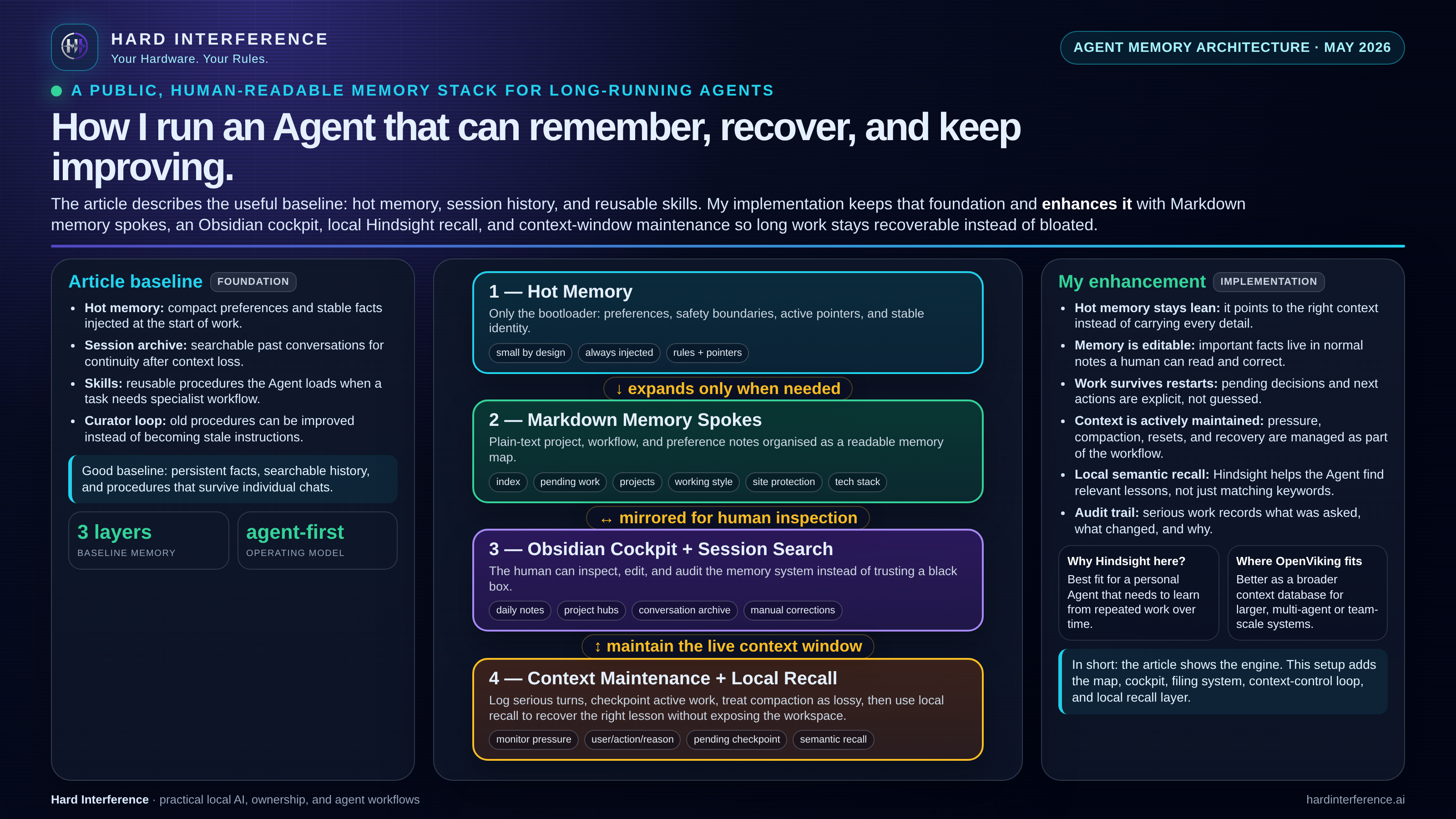
Hot memory is a bootloader
The agent has a small persistent hot memory area. It is injected into every serious session, so it has to be treated with respect.
At first, the temptation is obvious: put everything important in there.
Project details. Tool quirks. Site rules. Model routing. Security warnings. Writing style. Blog status. Hardware notes. That works for about five minutes. Then the memory fills up, old context lingers, and the agent starts carrying yesterday’s assumptions into today’s task.
So I stopped treating hot memory as the brain.
I treat it as a bootloader.
It keeps only the smallest stable facts:
- who the work is for
- what the hard safety boundaries are
- where the real memory lives
- what must be checked before making public changes
- which current checkpoint should be read first
That is it.
A bootloader does not store the operating system. It knows how to find it. Agent hot memory should do the same.
Why I use memory spokes
The real long-term memory lives in plain Markdown spokes.
Each spoke covers a domain: projects, pending decisions, working style, security, model routing, blog workflow, hardware, troubleshooting, publishing rules, and the other pieces that make the stack behave like an operator rather than a forgetful chatbot.
This gives me three advantages.
First, it keeps context specific. If the agent is working on the blog, it reads the blog memory. If it is debugging networking, it reads the networking memory. It does not drag the whole house into every room.
Second, it keeps the system editable. These are normal notes. I can open them, inspect them, correct them, and delete stale assumptions. I do not need to trust a hidden embedding store or a vague “memory updated” message.
Third, it makes recovery boring. If a conversation gets compacted, interrupted, or restarted, the agent does not have to guess what matters. It reads the index, then the active checkpoint, then the relevant spoke.
That boring part is important. Reliable systems are mostly boring in the right places.
Memory hygiene is not optional
The part nobody wants to talk about is hygiene.
Agent memory rots if you let it.
Not because the agent is stupid, but because reality changes. Ports move. Workflows change. Models get swapped. Site rules tighten. A draft becomes live. A temporary fix becomes dangerous if it stays in memory forever.
Memory hygiene is the habit of cleaning that up before it becomes a bug.
For me, that means:
- hot memory stays small and pointer-based
- stable detail gets moved into spokes
- procedures live in skills, not random memory fragments
- temporary work lives in a pending checkpoint, not scattered across chat history
- serious turns can be logged as user / action / reason
- stale instructions are corrected when reality proves them wrong
This is less glamorous than a new model. It is also more important.
A local agent that remembers bad instructions confidently is worse than one that forgets. Forgetting is annoying. Stale confidence breaks systems.
Context window maintenance is the live discipline
Memory hygiene keeps the durable store from rotting. Context window maintenance keeps the current working session from bloating. They are different jobs that get confused because they both involve the word memory.
The durable store is spokes and files and checkpoints. The live window is the conversation the agent is currently holding. That window has a hard size limit. When it fills up, something has to give.
If you leave it to the system defaults, what gives is usually meaning.
Most agents handle context pressure by compacting or discarding older turns. Compaction rewrites what happened. That is lossy compression, not archiving. If the agent is wrong about what matters in the compaction pass, the session starts carrying a compressed version of events that looks right but is not.
So I do three things differently.
First, I monitor context pressure before it becomes a failure. I do not wait for the agent to run out of room. I watch how much of the window is consumed, what is getting dropped, and whether the compaction pass is changing the tone or dropping facts that still matter. If the window is carrying too much noise, I reset with a clean continue rather than letting the agent silently compact its way into a worse state.
Second, I keep active decisions in a pending checkpoint, not scattered through chat history. The chat log is useful for reviewing what happened. It is terrible for holding what the agent is supposed to act on next. Active decisions, unresolved questions, and pending actions live in a checkpoint file that gets read first. That means a compaction pass cannot accidentally drop a task the agent is mid-way through.
Third, I treat compaction as lossy, not authoritative. When the agent compresses the session, I expect it to lose detail. The recovery path is not the compressed summary. The recovery path is INDEX → pending checkpoint → relevant spokes. If the live window gets wiped or starts carrying stale noise, the agent reads the index, finds the active checkpoint, and picks up from there with the right spoke context. That is boring and reliable.
Recovery is the test. If your agent can pick up mid-task after a full context reset without dropping a step, your context maintenance is working. If it cannot, you are relying on the live window staying alive forever, which it will not.
The discipline is: log serious turns as user / action / reason, keep the pending checkpoint authoritative, compact only when you have to, and reset deliberately when the noise ratio gets too high.
Where Obsidian comes in
Obsidian is the cockpit.
The agent uses Markdown because Markdown is simple, portable, and inspectable. Obsidian turns that pile of operational memory into something I can actually browse.
It lets me see what the agent thinks it knows.
That is the key point.
Without a human-readable layer, agent memory becomes a black box. You ask the agent to remember something, it claims it has, and later you find out that the actual stored version was incomplete, stale, or pointed at the wrong project.
With Obsidian in the loop, I can audit the memory map directly. I can see the project pages, system notes, daily logs, pending decisions, and skill references. I can check the state of the machine without asking the agent to narrate itself from memory.
The vault is not decoration. It is governance.
It means the human can inspect the agent, not just prompt it.
Local recall fills the gap
Spokes are excellent for structured knowledge. Session search is excellent for finding old decisions. Local semantic recall helps with the awkward middle ground: “I know we discussed this pattern before, but I cannot remember the exact words.”
That is where local Hindsight fits in the stack.
It is not there to replace the spokes. It is there to surface the right lesson when the exact keyword is missing.
The important word is local.
If the memory contains business plans, drafts, configuration notes, publishing workflows, and operational lessons, I do not want that becoming someone else’s training snack. The whole point of Hard Interference is that useful AI should be possible without surrendering the workshop.
Your hardware. Your rules.
The next guide: OpenViking on the ThinkStation PGX
The current setup works well for one human and one primary agent.
The next problem is multi-agent memory.
I am currently testing a Lenovo ThinkStation PGX as a future model-server and worker box: NVIDIA GB10 Grace Blackwell, 128GB unified memory, self-encrypting storage, DGX OS / Ubuntu Linux Pro, CUDA, the NVIDIA AI stack, fast networking, and enough headroom to stop treating local inference like a party trick.
The question is not just “can it run models?”
The better question is: can it become the private coordination layer for several agents working on different parts of the same operation?
That is where OpenViking becomes interesting.
My working direction is:
- hot memory stays per-agent and tiny
- each agent gets its own spoke set
- shared operational knowledge lives in a controlled common layer
- Obsidian remains the human-readable cockpit
- local recall helps agents find lessons without dumping private context into cloud systems
- secrets and source-of-truth memory move only after the hardware and workflow have been tested properly
I will write the PGX / OpenViking guide once the testing is far enough along to be useful rather than speculative.
Because that is the line I want Hard Interference to hold: show the build, show the trade-offs, show the parts that broke, then write the guide.
The point
Akshay is right to treat memory as a first-class part of agent design.
My answer is that memory should not be one bucket.
It should be a system:
- hot memory for bootstrapping
- spokes for durable operating knowledge
- skills for repeatable procedures
- session search for history
- local semantic recall for pattern recovery
- context window maintenance for live session discipline
- Obsidian for human inspection
- hygiene passes so the whole thing does not slowly lie to itself
That is how I want agents to work.
Not magical assistants. Not rented brains. Not black boxes with a “remember this” button.
Auditable tools, running on hardware I control, with memory I can inspect.
That is Hard Interference.
Your Hardware. Your Rules.
Found this useful? Follow Raf_VRS on X for more AI Guides and local AI build notes, and support the work here: ko-fi.com/rafvrs.
#HardInterference #AIMemory #HermesAgent #LocalAI